Post replies from Chrome
Subgrow finds the Reddit threads where your buyers are asking and writes a reply for each. Subgrow for Chrome lets you post those replies from the Reddit account signed in to your browser, one click at a time. It comes with a paid Subgrow plan.
Install it
Download it
In Subgrow, open Post from Chrome and click Download for Chrome. Unzip it: you get a folder called subgrow-chrome. Keep it somewhere it won't be deleted.
Load it into Chrome
Go to chrome://extensions, turn on Developer mode at the top right, click Load unpacked and pick the subgrow-chrome folder.
Connect it
Pin Subgrow from the puzzle-piece menu, click its icon, then Connect. Subgrow opens; click Connect there once and every brand on your plan is in the extension.
Post with it
Pick a thread
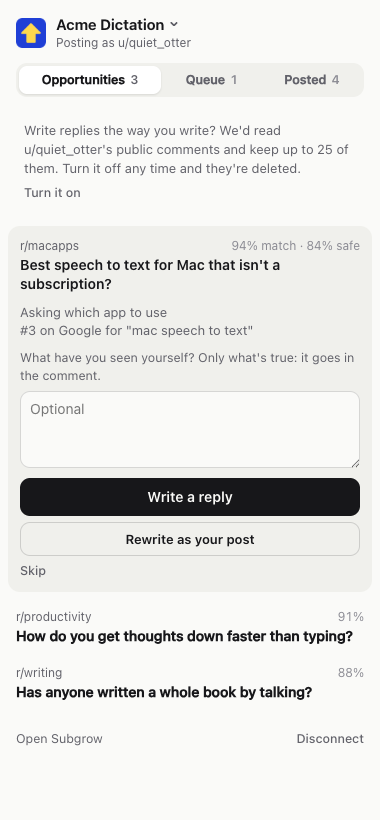
Opportunities lists the threads worth a reply, best fit first. Write a reply writes one; Skip drops a thread.
Read it, then post it
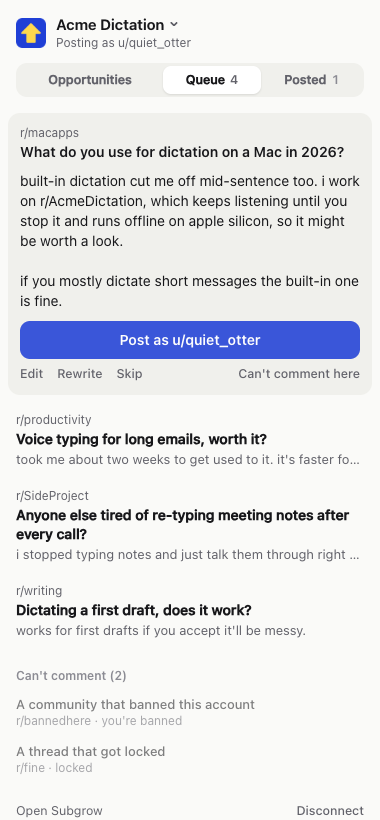
In Queue, click the reply to edit it, or Rewrite for new words. Open the thread to read it on Reddit, then Post as your account. The tab goes to your comment, and its link is saved in Subgrow.
Good to know
- Nothing is posted unless you click, and your Reddit password never reaches us.
- Threads your account can't comment on, because you're banned there or the thread is locked, are grayed out.
- If the same words are already in the thread, it saves that comment's link instead of posting twice.
- When we update the extension, download it again and replace the folder.